
Description
✅ Condition: New – Factory-tested quality & Warranty
✅ 5150mAh High Capacity – Restores rugged phone battery life for outdoor use
✅ CE / RoHS / UN38.3 Certified
✅ 90-Day Warranty from delivery – Longer coverage than major platforms
✅ Ships in 3-7 days with tracking
🛡️ Shipping Protection Available at Checkout
✅ PayPal Buyer Protection included
✅ 100% Compatibility Guarantee – If it doesn’t fit, we’ll refund you. No questions asked.
⚠️ Low Stock Alert: Only 8 left in stock. Order now to avoid waiting.
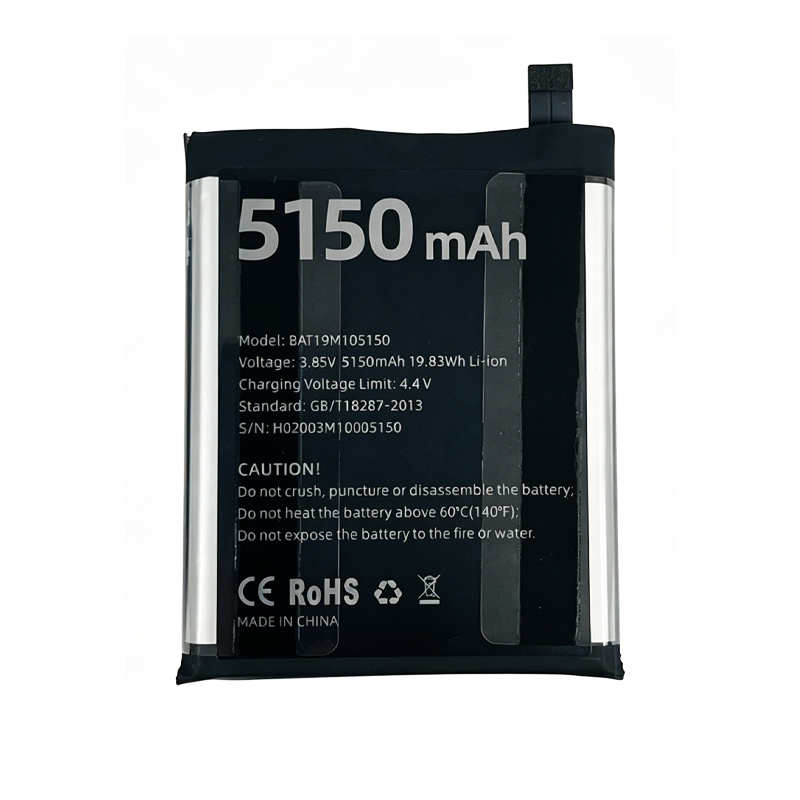
Battery model: BAT19M105150
Capacity: 5150mAh / 19.8Wh
Rated voltage: 3.85V
Charge limit voltage: 4.4V
Battery type: Li-ion Polymer (Grade A cells)
Compatible with: Doogee S95, Doogee S95 Pro
Package include: 1 x battery
Revive your Doogee rugged smartphone with this BAT19M105150 5150mAh replacement battery. The Doogee S95 and S95 Pro are known for their IP68/IP69K dust and water resistance, MIL-STD-810G military-grade durability, and unique modular design with interchangeable battery cases. This Li-ion Polymer battery restores the original 5150mAh capacity for all-day use in challenging environments. Built with high-density cell technology and multi-layer safety protection against overcharge, over-discharge, and short circuits. CE, RoHS, and UN38.3 certified.
Technical Details for Doogee S95 / S95 Pro Owners: Both devices feature a 6.3-inch FHD+ display, MediaTek Helio P90 processor, and support 24W fast charging (9V/2.7A). The S95 Pro includes additional features like wireless charging and a macro camera. This BAT19M105150 battery for Doogee S95 maintains the original 4.4V charge termination voltage (3.85V nominal) and uses low-resistance cells to ensure stable power delivery. Unlike lower-quality alternatives, this Doogee S95 Pro battery replacement supports the original 24W fast charging protocol. The built-in protection circuit module (PCM) guards against over-charge, over-discharge, short circuit, and over-current.
Important Note for Rugged Phone Users: The Doogee S95 and S95 Pro are designed with IP68/IP69K waterproof seals and a modular “Endurance Mode” battery system that allows you to attach a 3500mAh battery case. When replacing the internal BAT19M105150 battery, special attention must be paid to the waterproof gaskets and seals. Improper installation may compromise the IP69K high-pressure water jet resistance. The original battery is secured with strong adhesive — heating is required to soften it, and new adhesive should be applied during reassembly to maintain the water-resistant seal. If your Doogee S95 battery drains quickly after exposure to water or dust, this replacement battery will restore original performance.
Step‑by‑Step Installation Guidance: Professional installation is strongly recommended for this Doogee S95 battery replacement due to the waterproof sealing. If you choose to DIY: 1) Power off the device completely. 2) Remove the modular battery case if attached. 3) Heat the back cover to approximately 70°C to soften the waterproof adhesive. 4) Carefully pry open the back cover with a suction cup and plastic spudger — avoid damaging the flex cables. 5) Remove the cover screws and disconnect the battery connector (pull by the plug, not the wires). 6) The BAT19M105150 battery is lightly adhered; use a plastic spudger to lift it. 7) Install the new battery, reconnect the connector, then reassemble. 8) Apply new waterproof adhesive to maintain IP68/IP69K rating. 9) If the device doesn’t power on, leave it connected to a 5V/2A charger for 10-15 minutes to activate the protection circuit.
Battery Care for Rugged Phones: For maximum lifespan, keep battery level between 20% and 80% for daily use. Use a standard 5V/2A or compatible 24W fast charger (9V/2.7A) — avoid using Quick Charge (QC) or Power Delivery (PD) chargers that negotiate higher voltages. If storing the device for more than 2 months, keep the battery at approximately 60% charge. Avoid leaving the Doogee S95 in extremely hot environments (e.g., inside a car in summer) — rugged phones have better thermal management but heat still accelerates battery degradation. Stop using immediately if the battery shows any swelling. For optimal Doogee S95 battery replacement calibration, perform one full discharge-recharge cycle (drain until auto-shutoff, then charge uninterrupted to 100%) after installing a new battery to help the system calibrate battery level reporting.
Discover more from Battery.qingsm.tech
Subscribe to get the latest posts sent to your email.
Reviews
There are no reviews yet.