
Description
✅ Condition: Brand New – Never used, factory-tested quality
✅ 3500mAh High Capacity – Extended retro gaming sessions for UX-optimized handheld
✅ CE / RoHS / UN38.3 Certified
✅ 90-Day Warranty from delivery – Longer coverage than major platforms
✅ Ships in 3-7 days with tracking
🛡️ Shipping Protection Available at Checkout
✅ PayPal Buyer Protection included
✅ 100% Compatibility Guarantee – If it doesn’t fit, we’ll refund you. No questions asked.
⚠️ Low Stock Alert: Only 8 left in stock. Order now to avoid waiting.
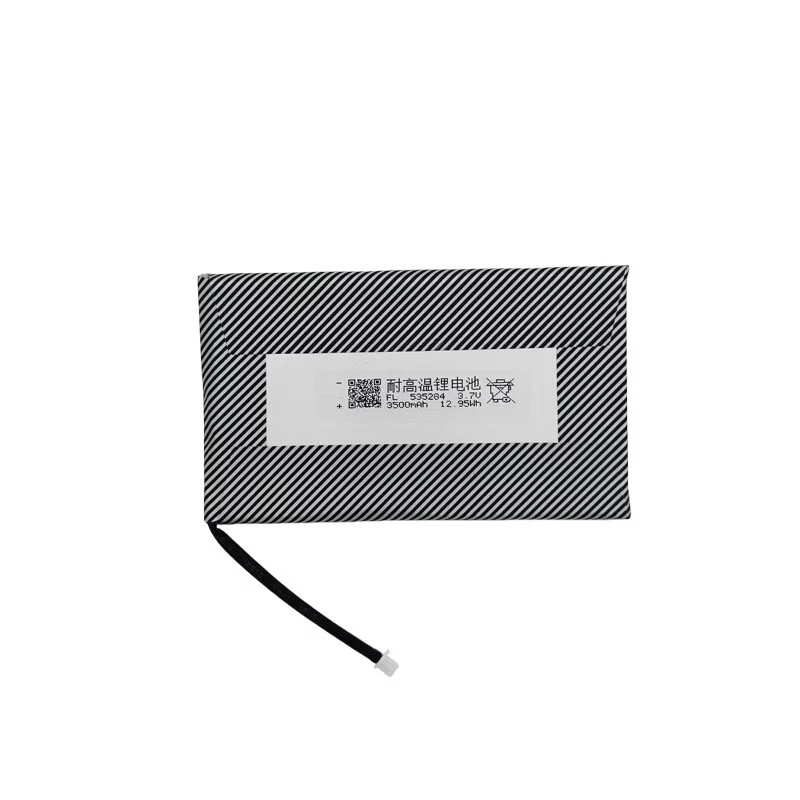
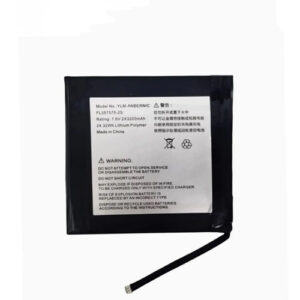
Battery model: For Anbernic RG353 MIin UX
Capacity: 3500mAh
Rated voltage: 3.7V
Charge limit voltage: 4.2V
Battery type: Li-ion Polymer (Grade A cells)
Compatible with: Anbernic RG353MIinUX, Anbernic RG 353MIin UX
Package include: 1 x battery
Restore your Anbernic RG353MIinUX handheld to peak performance with this 3500mAh Li-ion Polymer replacement battery. The RG353MIinUX is a special variant of the RG353M, featuring the same premium unibody aluminum shell and horizontal form factor but with optimized UX (user experience) firmware for enhanced dual-boot (Android 12 and Linux) operation. This battery is specifically dimensioned to fit the RG353MIinUX’s metal housing — a critical detail because the aluminum shell has very tight internal tolerances. Generic batteries often have slightly thicker cells or incorrect cable routing, causing the backplate to bulge or not close fully. This 3500mAh replacement battery for Anbernic RG353MIinUX matches the original cell’s dimensions and uses the correct small 2‑pin micro connector with the cable exiting at the proper angle.
Technical Details for RG353MIinUX Owners: The RG353MIinUX runs on a Rockchip RK3566 chipset paired with a 3.5-inch IPS display (640×480 resolution). This Anbernic RG353MIinUX battery replacement maintains the original 4.2V charge termination voltage and uses low‑resistance cells to ensure stable power delivery during emulation of N64, Dreamcast, PSP, and PlayStation 1 titles. Unlike the plastic-shell RG353V/VS, the RG353MIinUX’s metal body dissipates heat differently, and this battery has been tested under sustained emulation loads to ensure stable voltage output within the aluminum enclosure. The built-in protection circuit module (PCM) guards against over‑charge, over‑discharge, short circuit, and over‑current. CE, RoHS, and UN38.3 certified for safety. For best longevity, avoid frequently draining the battery below 10% — lithium-ion cells prefer partial discharges.
Step‑by‑Step Installation Guide for RG353MIinUX: 1) Power off the device and remove the four small Phillips screws on the back (use PH00 screwdriver). 2) Gently separate the metal backplate starting from the bottom edge — the RG353MIinUX’s aluminum shell has no hidden clips, but the adhesive may be strong. Use a plastic spudger to carefully pry. 3) The battery is located in the lower half, connected to the motherboard by a small 2‑pin connector. 4) Use a plastic spudger to lift the original battery (it is lightly adhered). 5) Disconnect the old battery’s connector by pulling the plug (not the wires). 6) Connect the new battery — the connector is keyed and only fits one way; do not force it. 7) Place the new battery in the compartment, then reassemble the backplate. 8) If the device doesn’t power on after battery replacement, leave it connected to a 5V/2A charger for 10‑15 minutes to activate the protection circuit.
Compatibility & Dual-Boot Note: Fits Anbernic RG353MIinUX and RG 353MIin UX only — not compatible with standard RG353M (although battery is identical, the UX firmware variant has optimized power management), RG353V, RG353VS, RG351 series, or RG40XX series. The RG353MIinUX is distinguished by its metal shell, horizontal form factor, and dual-boot Android/Linux UX-optimized firmware. After installing a new battery in this dual‑boot device, perform one full charge cycle (drain to auto‑shutoff, then charge uninterrupted to 100%) to help both Android and Linux calibrate battery reporting. If your RG353MIinUX shuts down unexpectedly when the battery indicator still shows charge, this 3500mAh replacement battery for Anbernic RG353MIinUX will restore stable power delivery.
Battery Care for Metal Handhelds: For maximum lifespan, keep battery level between 20% and 80% for daily use. Do not use Quick Charge (QC) or Power Delivery (PD) fast chargers — only use a standard 5V/2A charger. The RG353MIinUX’s charging circuit is not designed for fast charging protocols. If storing the device for more than 2 months, keep the battery at approximately 60% charge. Avoid leaving the RG353MIinUX in hot environments (e.g., inside a car in summer) — the metal shell can get very hot and accelerate battery degradation. Stop using immediately if the battery shows any swelling. For optimal Anbernic RG353MIinUX battery life, avoid charging the device while playing demanding games for extended periods, as the combination of charging heat and processor heat inside the metal shell accelerates degradation.
Discover more from Battery.qingsm.tech
Subscribe to get the latest posts sent to your email.
Reviews
There are no reviews yet.