
Description
✅ Condition: New – Factory-tested quality & Warranty
✅ 5100mAh High Capacity – All-day battery life for X40/X9a/Magic 5 Lite
✅ CE / RoHS / UN38.3 Certified
✅ 90-Day Warranty from delivery – Longer coverage than major platforms
✅ Ships in 3-7 days with tracking
🛡️ Shipping Protection Available at Checkout
✅ PayPal Buyer Protection included
✅ 100% Compatibility Guarantee – If it doesn’t fit, we’ll refund you. No questions asked.
⚠️ Low Stock Alert: Only 8 left in stock. Order now to avoid waiting.
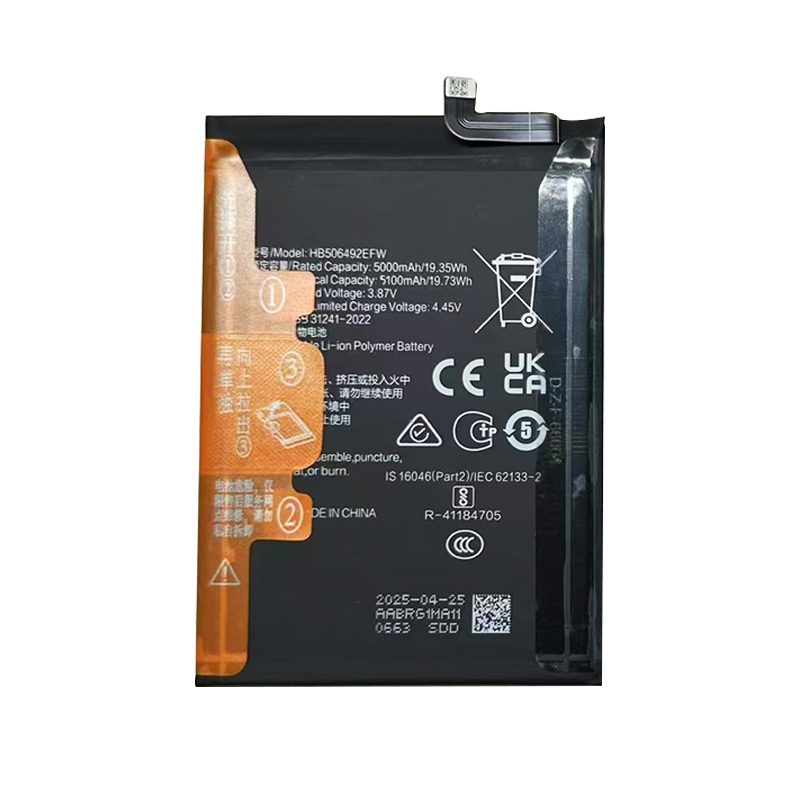
Battery model: HB506492EFW
Capacity: 5100mAh / 19.61Wh
Rated voltage: 3.85V
Charge limit voltage: 4.45V
Battery type: Li-ion Polymer (Grade A cells with dual IC protection)
Compatible with: Honor X40 (RMO-AN00), Honor X9a (RMO-NX1), Honor Magic 5 Lite (RMO-NX3), Honor X9a 5G, Honor 5 Lite
Package include: 1 x battery
Restore the long-lasting power of your Honor smartphone with this HB506492EFW 5100mAh Li-ion Polymer replacement battery. Designed for the Honor X40, X9a, and Magic 5 Lite series, this battery delivers reliable performance for all-day gaming, streaming, and multitasking. These devices feature a 6.67-inch AMOLED display and support 40W fast charging. This HB506492EFW battery for Honor X40 is built with high-density cell technology and dual IC safety protection against overcharge, over-discharge, and short circuits. CE, RoHS, and UN38.3 certified for safety compliance.
Technical Details for Honor Users: The HB506492EFW 5100mAh battery replacement for Honor X9a and Magic 5 Lite maintains the original 4.45V charge termination voltage (3.85V nominal). This Honor X40 battery replacement uses low-resistance cells to ensure stable power delivery during heavy use. Unlike lower-quality alternatives, this 5100mAh battery for Honor X40 supports the original 40W wired fast charging protocol, allowing you to quickly top up your device. The built-in protection circuit module (PCM) provides over-charge, over-discharge, short circuit, and over-current protection. For best longevity, avoid frequently draining the battery below 10% — lithium-ion cells prefer partial discharges between 20% and 80%.
Device Features & Battery Performance: The Honor X40 features a 6.67-inch AMOLED display with a 120Hz refresh rate. With this HB506492EFW replacement battery for Honor Magic 5 Lite, you can expect all-day performance. The Honor X9a and Magic 5 Lite share similar battery specifications, making this HB506492EFW battery for Honor X9a a perfect cross-compatible replacement. The 5100mAh capacity typically provides up to 12-14 hours of mixed usage depending on screen brightness and apps.
Compatibility Note: This HB506492EFW battery fits Honor X40 (RMO-AN00), Honor X9a (RMO-NX1), Honor Magic 5 Lite (RMO-NX3), Honor X9a 5G, and Honor 5 Lite. Please check your original battery model before ordering — the model number is printed on the battery label inside your phone. If your phone shuts down unexpectedly or drains too quickly, this replacement will restore stable power delivery.
Installation Guidance: These Honor devices have sealed designs with strong adhesive. Professional installation is strongly recommended. If you choose to replace the battery yourself: 1) Power off the device completely. 2) Heat the back cover to soften adhesive (use a heat gun at no more than 70°C). 3) Carefully pry open the back cover with a suction cup and plastic spudger. 4) Remove the cover screws and disconnect the battery connector by pulling the plug (not the wires). 5) Remove the old battery (lightly adhered), connect the new HB506492EFW battery, then reassemble. 6) If the device doesn’t power on after replacement, leave it connected to the original charger for 10-15 minutes to activate the protection circuit.
Battery Care Tips: For maximum lifespan, keep battery level between 20% and 80% for daily use. Use the original Honor charger and cable for optimal compatibility. If storing the device for more than 2 months, keep the battery at approximately 60% charge. Avoid leaving the phone in hot environments (e.g., inside a car in summer) — heat accelerates battery degradation. Stop using immediately if the battery shows any swelling. For optimal battery calibration, perform one full discharge-recharge cycle (drain until auto-shutoff, then charge uninterrupted to 100%) after installing a new battery.
Discover more from Battery.qingsm.tech
Subscribe to get the latest posts sent to your email.
Reviews
There are no reviews yet.